> ## Documentation Index
> Fetch the complete documentation index at: https://nango-scrips-ref.mintlify.site/llms.txt
> Use this file to discover all available pages before exploring further.
# Custom Integrations - Overview
> High-level steps to build a custom integration with Nango.
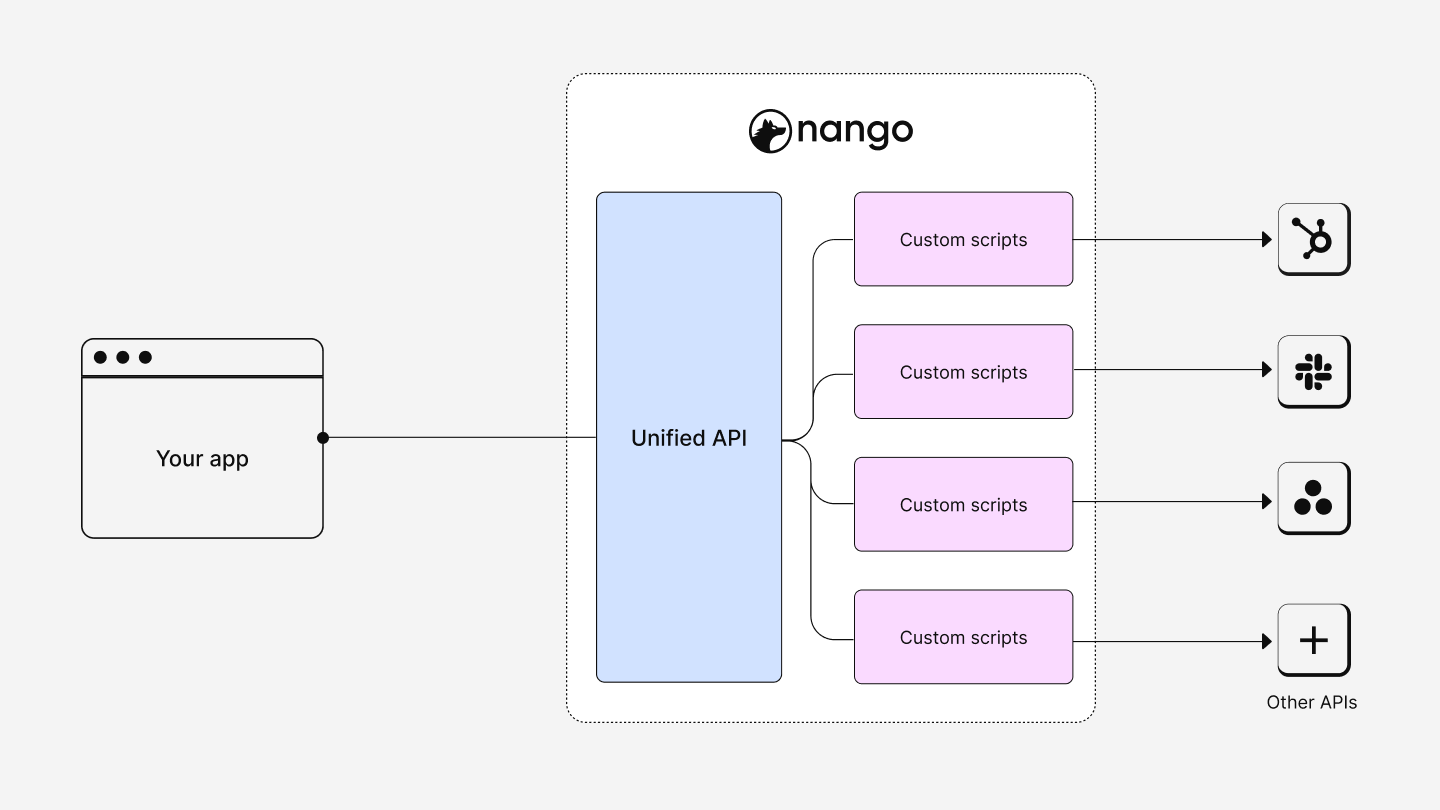 Nango lets you create custom integrations through code. Unlike pre-built integrations, custom integrations provide the flexibility to address unique or complex requirements.
# Key concepts
**Code-defined integrations**
* Define integrations with code, offering full customization capabilities.
* Integrate with any API, adapting to specific use cases and data requirements.
**Integration-specific tooling**
* Utilize tools designed to simplify and maintain the integration code (e.g. rate limits, pagination, etc.).
* Ensure code quality and manageability without compromising on flexibility.
**Integration execution and management**
* Scripts are executed on Nango's infrastructure, enabling observability, scalability, and manageability.
* Leverage multiple Nango environments to streamline the deployment process
**Development workflow**
* Develop and test integrations in your local environment using familiar tools and practices.
* Use Git for version control, integrating your integration code into your existing codebase management workflow.
# Benefits of custom integrations
* **Flexibility**: Tailor integrations to the exact requirements of your application and the external APIs you wish to connect with.
* **Development Speed**: Reduce the time from concept to deployment, enabling your team to ship integrations faster.
* **Scalability**: Leverage Nango's infrastructure to scale your integrations as your application grows.
* **Observability**: Gain insights into the performance and health of your integrations through Nango's monitoring tools.
* **Manageability**: Nango's UI & API allows fine-grained control of the execution of your integrations.
**Questions, problems, feedback?** Please reach out in the [Slack community](https://nango.dev/slack).
Nango lets you create custom integrations through code. Unlike pre-built integrations, custom integrations provide the flexibility to address unique or complex requirements.
# Key concepts
**Code-defined integrations**
* Define integrations with code, offering full customization capabilities.
* Integrate with any API, adapting to specific use cases and data requirements.
**Integration-specific tooling**
* Utilize tools designed to simplify and maintain the integration code (e.g. rate limits, pagination, etc.).
* Ensure code quality and manageability without compromising on flexibility.
**Integration execution and management**
* Scripts are executed on Nango's infrastructure, enabling observability, scalability, and manageability.
* Leverage multiple Nango environments to streamline the deployment process
**Development workflow**
* Develop and test integrations in your local environment using familiar tools and practices.
* Use Git for version control, integrating your integration code into your existing codebase management workflow.
# Benefits of custom integrations
* **Flexibility**: Tailor integrations to the exact requirements of your application and the external APIs you wish to connect with.
* **Development Speed**: Reduce the time from concept to deployment, enabling your team to ship integrations faster.
* **Scalability**: Leverage Nango's infrastructure to scale your integrations as your application grows.
* **Observability**: Gain insights into the performance and health of your integrations through Nango's monitoring tools.
* **Manageability**: Nango's UI & API allows fine-grained control of the execution of your integrations.
**Questions, problems, feedback?** Please reach out in the [Slack community](https://nango.dev/slack).